DVD
Settings to remove DVD protections
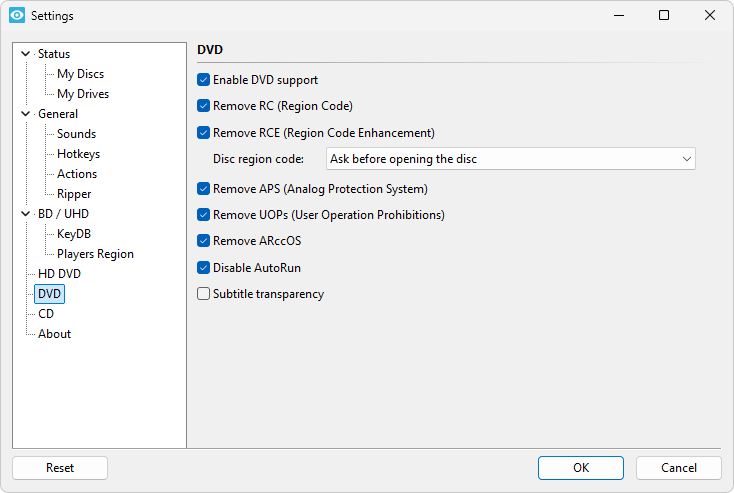
Enable DVD support
If this option is selected, Xreveal will scan and process DVDs; otherwise, Xreveal will not process DVDs.
Remove RC (Region Code)
Removes the Region Code from the DVD. The DVD will appear region free to all software.
Remove RCE (Region Code Enhancement)
This will disable Region Code Enhanced.
Remove APS (Analog Protection System)
This will remove Analog Protection System (Macrovision) from your DVD.
Remove UOPs (User Operation Prohibitions)
This will remove all user prohibited operations (not allowed to change or disable subtitles, not allowed to skip copyright notice).
Please note, that sometimes user actions which were prohibited will now lead to a "dead end" and your player software may behave strange or may even crash.
Remove ARccOS
This will remove ARccOS protection.
Disable AutoRun
This will disable "AutoRun" on Video discs. This is an effective way to prevent software, that has been put on the DVD together with the movie, to start automatically.
Subtitle transparency
You can specify the transparency of all DVD subtitles & subpictures. This can be helpful if you use a projection system to watch DVDs, because bright subtitles can reduce the contrast of the picture.