BD / UHD
Settings to remove BD / UHD protections.
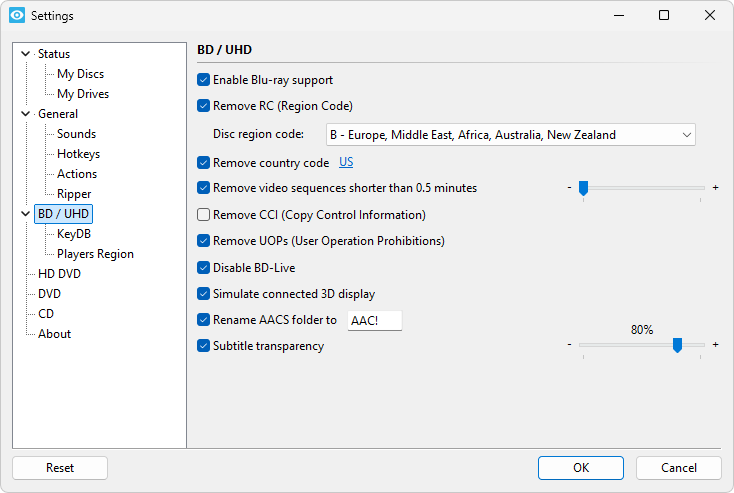
Enable Blu-ray support
If this option is selected, Xreveal will scan and process Blu-rays; otherwise, Xreveal will not process Blu-rays.
Remove RC (Region Code)
If this option is enabled, the region check on Blu-ray discs will be removed.
IMPORTANT: You must set the Blu-ray region in Xreveal to match the region of the disc you wish to play or copy!
Remove country code
Some US anime discs require this.
Remove UOPs (User Operation Prohibitions)
This will remove all user prohibited operations (not allowed to change or disable subtitles, not allowed to skip copyright notice).
Please note, that sometimes user actions which were prohibited will now lead to a "dead end" and your player software may behave strange or may even crash.
Remove CCI (Copy Control Information) Pro
Remove CCI in M2TS streams.
Disable BD-Live
This option will disable BD-Live (interactive content over the internet).
Simulate connected 3D display
Discs authored to play only in 3D can be viewed on a 2D display. A 3D capable player must be used for playback.
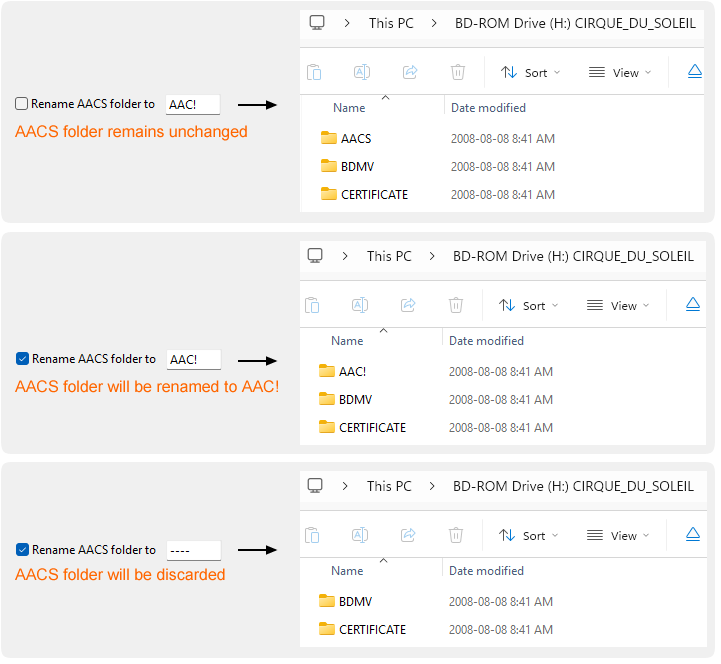
Rename AACS folder to ?
| Option state | Value | Description |
|---|---|---|
| Unchecked | Keep /AACS folder untouched | |
| Checked | any other values, the default is AAC! | Rename /AACS folder to the specified value |
| ---- | Hide /AACS folder |
Remove annoying adverts and trailers
All video sequences that are usually played before the first menu appears or BD-J is loaded, will be skipped during playback.
Remove video sequences shorter than ? minutes Pro
Ranges: [0.5 minutes, 20 minutes]
Video sequences that don't belong to a menu and are shorter than the specified playback time will be skipped during playback. This will work with all Blu-ray discs, including Java titles.
Subtitle transparency Pro
Ranges of the transparency: [0% - invisible, 100% - solid]
You can specify the transparency of subtitles & subpictures. This can be helpful if you use a projection system, because bright subtitles can reduce the contrast of the picture. You can specify the visibility in percent, e.g. 100% is solid, 50% is half transparent, 0% is inbisible.
Note: Modifying the subtitle transparency will change the M2TS data, and it cannot be restored to the original M2TS, so it can no longer be verified using Content Hash Verifier.